Create PDK Access Groups
Learn how to setup access groups to be used for granting access in Gymflow.
Written By Isaac Buchanan
Last updated 8 months ago
How Access Groups Work:
Access groups list the doors (devices) that any users assigned to that group will be allowed to open.
The Gymflow integration with PDK works by assigning users to access groups if the membership or booking they have is related to a PDK access group.
How Schedules Work:
Schedules allow you to restrict the hours a member can open a door. This is not required for booking based or gyms that operate 24 hours.
If you either are not open 24 hours or have an off peak membership then you would need to set a schedule to control the hours in where the door can be opened.
To add a schedule to a group simply:
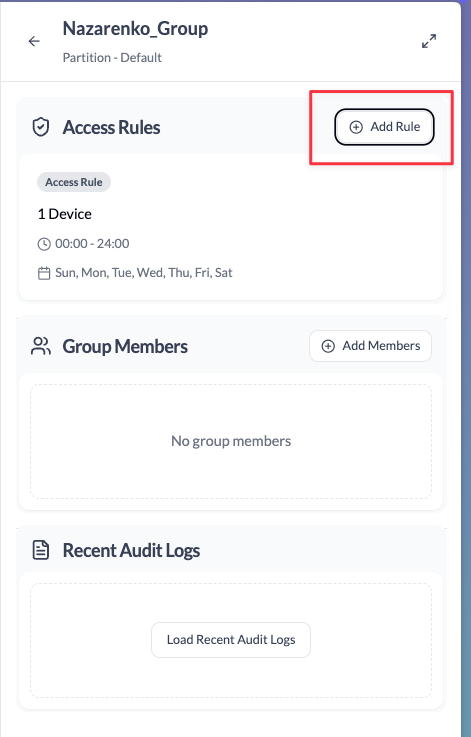
In PDK click on the group and click “Add Rule”
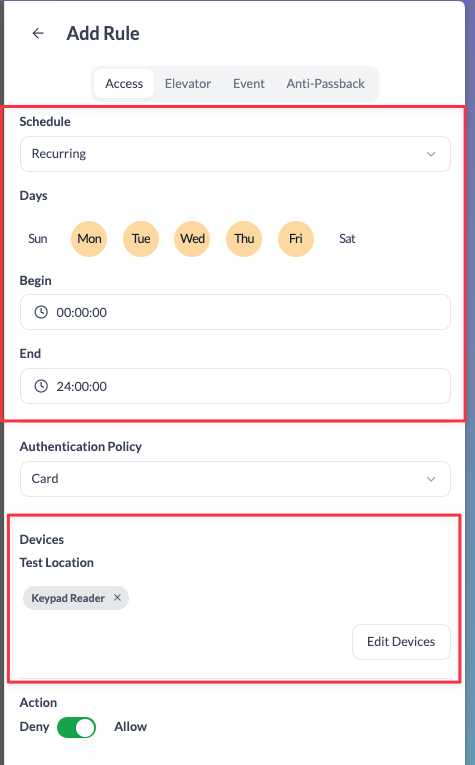
Set your recurring schedule and doors and save (note if you have different hours on different days you need to repeat this step)
Was this helpful?
Still need help? Share an idea