Complete Onboarding
Learn how to get access to all app features by completing the Onboarding
Written By Anna Gertsen
Last updated 4 months ago
When you first sign up, you only need your name, email, phone number, and agreement to the club’s waiver and terms to create an account and make a purchase. However, many clubs require additional profile information before you can book classes or access the gym.
The required information varies by club, but you may be prompted to provide a profile picture, your address, date of birth, or other details.
Here is the quick process for completing your onboarding:
Sign In: Open your members app and sign up or log in.
Start Onboarding: At the top of the main screen, look for a banner or message prompting you to "Complete Onboarding". Tap on this message.
Provide Details: You will be taken to the dedicated onboarding page. Follow the prompts to enter all the necessary information required by your club.
Finish Up: Once all fields are completed and submitted, your account setup is finished.
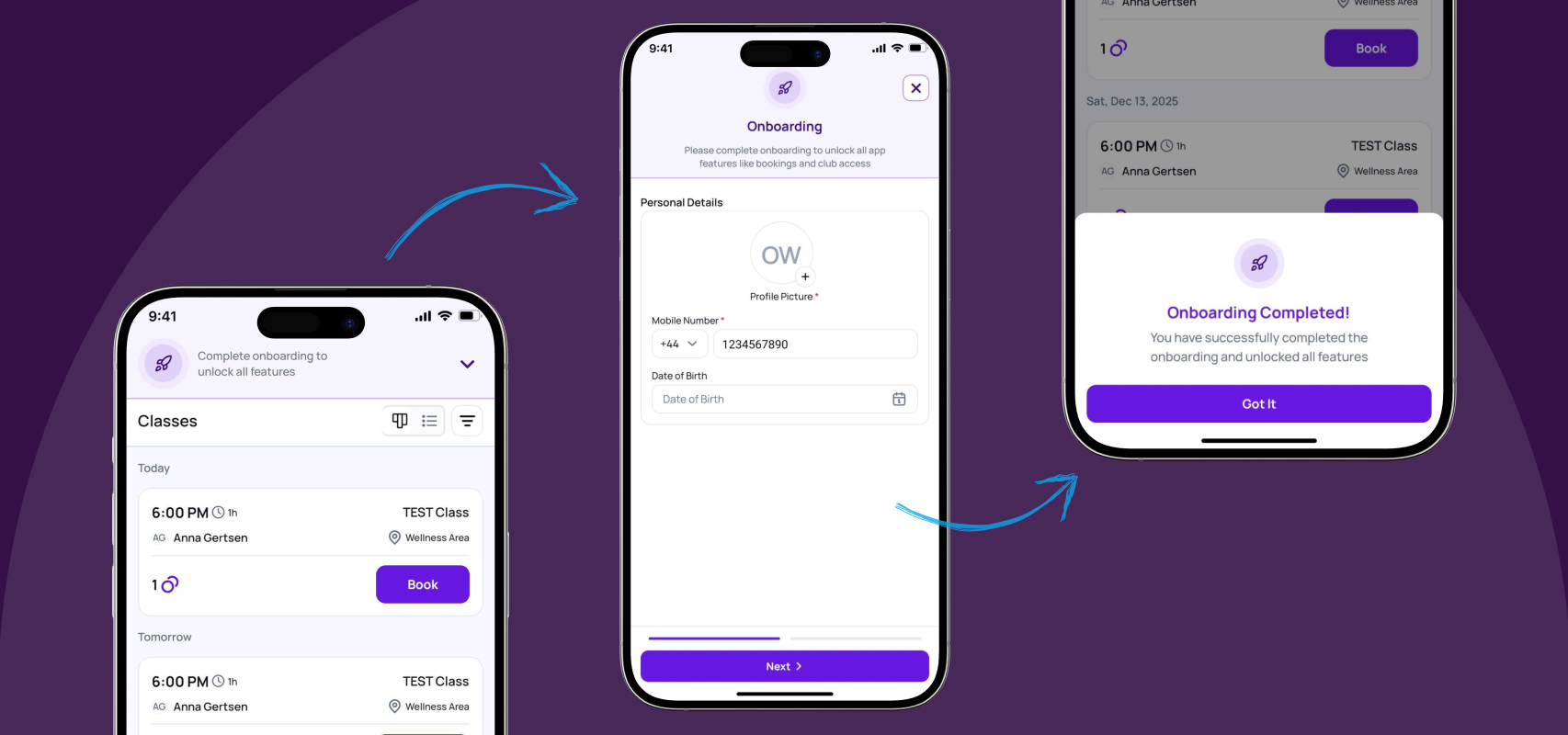
Next Steps: You can now proceed to book a class, schedule an appointment, or fully access the gym's services.
Was this helpful?
Still need help? Share an idea