User Onboarding
Achieve more sales by capturing the information you need from your users after they complete the purchase.
Written By Isaac Buchanan
Last updated 6 days ago
Overview
We’ve overhauled the user registration and purchase process to drastically speed things up and reduce friction so you get more sales for your business. These changes are across all areas of Gymflow including the mobile apps.
Simplified user registration: Only full name, email and password are required to register accounts now, making the process much faster. This gets new users to the checkout faster meaning you get more sales!
User Onboarding: Clubs can still capture all the data they need before the users books or accesses the club using our new streamlined onboarding process that captures the information in bite size pieces only when required.
They can complete onboarding anytime by clicking a banner at the top of their screen or will be prompted to complete if they go to book or access the club.
This new flow collects information in bite size pieces only when needed for a much nicer user experience.
Moving these fields out of the initial registration also brings us one step closer to allowing Apple & Google sign up, as they do not allow fields like mobile number during registration.
How To Setup
In the Gymflow Staff Web Portal go to Settings > Customizations
Select Onboarding (under Other)
Toggle on the Onboarding Fields you want to collect
Drag and Drop them into the column you want, either Required or Optional
There’s a lot of information you can ask for. We recommend only asking for what you really need, keeping things simple.
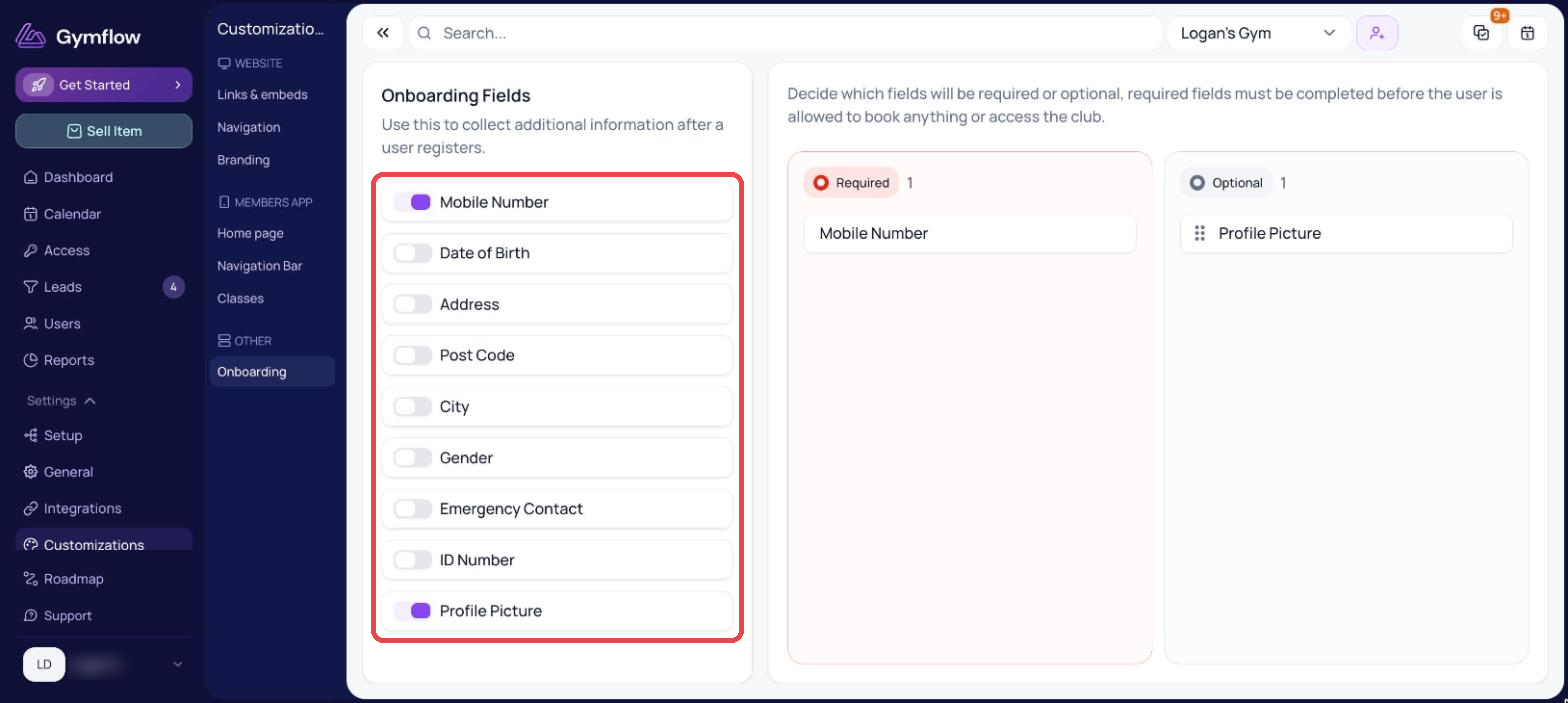
For existing customers of Gymflow, all Form fields that you previously had set up will automatically transfer to be “required” and in the Required section.
Editing your Onboarding
Changing fields from Optional to Required or vice-versa is a breeze. Just go back to Settings > Customizations > Onboarding and make any changes you want.
If you add or remove fields it will not affect your existing users. Adding a field will just add it to your Onboarding flow for new users, and removing a field will keep your existing users data saved. So you don’t have to break a sweat! 😅
What your users will see
Your members will see a beautifully segmented onboarding with only the fields you have asked for. Some mandatory, others optional, depending on how you set it up. How clean is this?! 😎
Was this helpful?
Still need help? Share an idea