Capture leads with the "Contact Us" form
Learn how to use Gymflow's "Contact Us" form to capture leads
Written By Anna Gertsen
Last updated 6 days ago
Not all people interested in your club will purchase immediately, many of them will want to ask some questions, speak to someone or try out the club's services before making a financial commitment.
It's best practice to have a contact form on your website, typically shown after your membership options and information about your business. This is the last resort for potential customers, if what they have seen so far on your site hasn't convinced them to purchase they can reach out to you to learn more.
You can link or embed the "Contact Us" form to your website, social media accounts or any other online page. Anyone that fills out the form will be immediately added to your Gymflow account with the status of "New Lead".
To get your link or embed code:
Navigate to Settings > Customizations > Links & embeds
Find the "Contact Us" row and click Link to copy the link or Code to copy the embed code
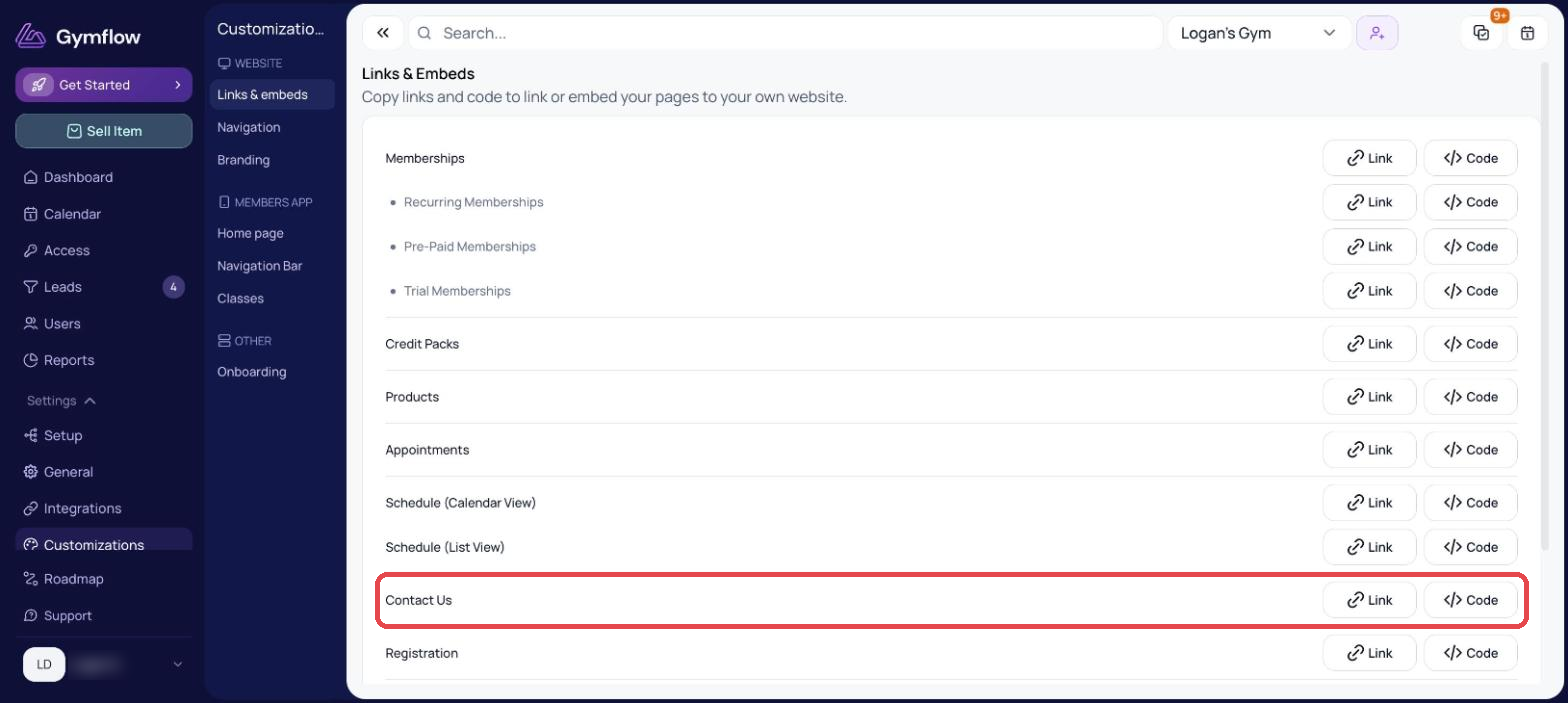
Post this link in your social media bio, or link it to a button on your website, or embed it in a section on your website. To see more detailed instructions see the Website Integration section.
Was this helpful?
Still need help? Share an idea