Late Payment Fees
Learn how to implement failed payment fees to reduce overdue payments and increase revenue.
Written By Isaac Buchanan
Last updated 7 days ago
Overview
The Late Payment Fees feature allows clubs to automatically charge members a configurable fee when their recurring subscription payment fails and remains unpaid beyond a specified time period. This guide will walk you through setting up and managing this feature.
These fees will act as a deterrent to paying late, reducing administration time. Where the payment still fails the club will receive a fee to help cover the additional admin time spent.
The feature offers:
⚙️ Membership level settings: Customize fees for specific membership types
😮💨 Grace Period Control: Configure grace period (1-5 days) before fee is applied
💵 Fee Collection: Fees are automatically collected
🔁 Fee Re-Tries: Any un-collected fees will be re-tried up to 4 times automatically
✉️ Email Notifications: Automated emails about applied fees are sent to avoid disputes
Pre-Requisistes
Before implementing, please ensure that late payment fees are outline in your membership terms and conditions. If they are not part of your current terms and conditions:
Update your recurring memberships terms and conditions
Communicate the changes to your members at least 30 days prior to turning them on
Update your Membership Overdue email Automation to include details of your late payment fees as a warning.
Failure to do so will likely result in members disputing late payment fees as they will be un-aware and you will not have any reasonable basis to counter any claims.
How It Works
Lets assume you have a $5 late payment fee on all memberships with a 1 day grace period and the members bills on the 1st of each month.
On the 1st of the month if the membership payment fails the member will be sent the usual overdue payment reminder with the warning that a fee will be charge if not resolved in 1 day.
On the 2nd of the month if the membership is still overdue a $5 fee will be added and the system will try to collect both payments.
If successfully the membership will return to an active status, if it’s not successfully then the system will continue to re-try both amounts up to 4 times over two weeks.
It’s possible that one of the two fees might be collected e.g the membership fee but not the late payment fee. The member will not be able to access the gym whilst there is any outstanding payments so will still be required to pay the fee to enter the gym.
How To Setup
Step 1: Set Fees & Grace Periods
Head to Settings > Setup > Memberships
Click the pencil icon on any recurring membership
Click the pencil icon in the Pricing section
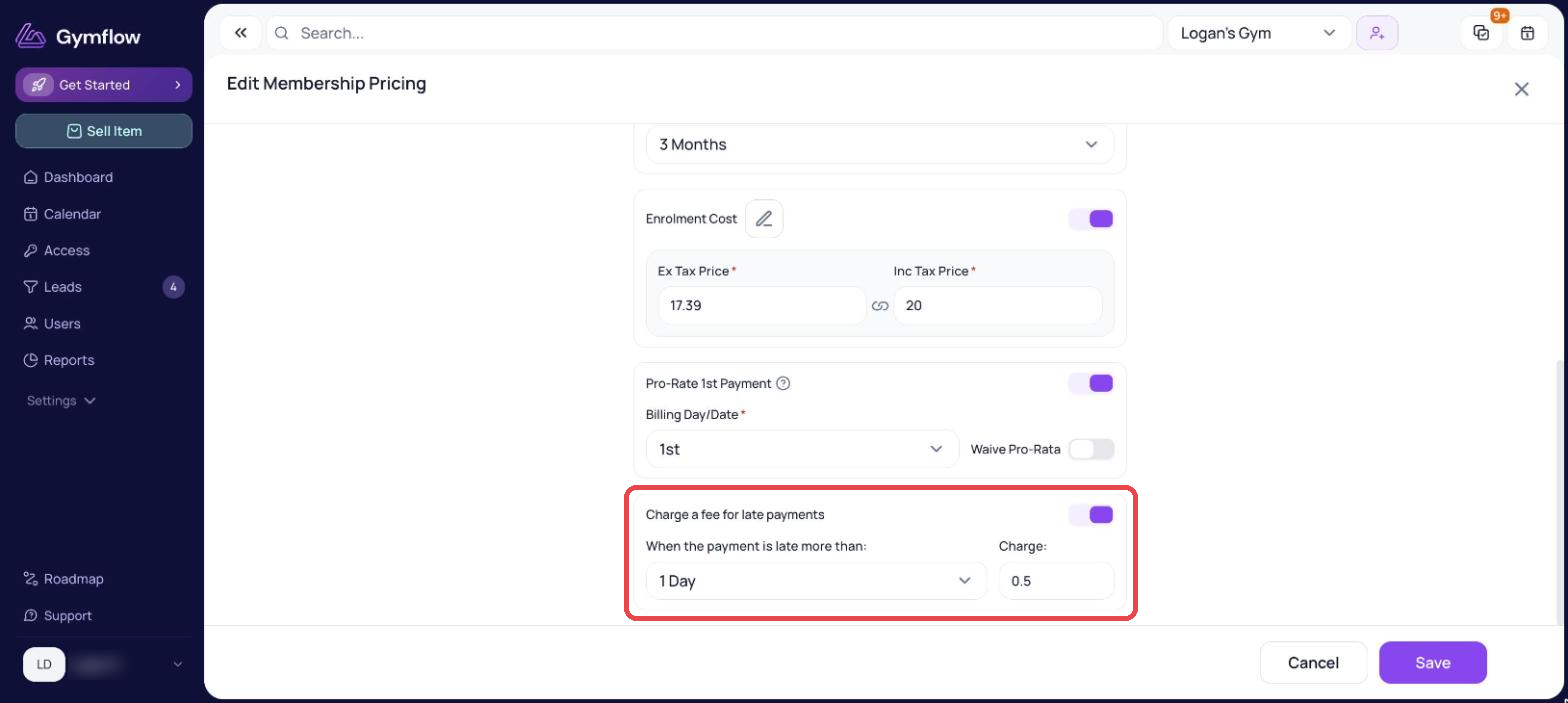
Turn on Charge a fee for late payments, choose when the payment is late more than (your grace period), enter the Charge and click Save
Repeat for any other memberships you want fees applied
You can also turn on late payment fees when creating a new membership, in the Pricing step.
Best Practices
To ensure failed payment fees dont have a negative impact on your members:
Start with reasonable fees: Don't set fees so high that they create member retention issues, we would suggests no more than 10% of the membership value e.g $50pm would be a $5 late fee.
Use appropriate timing: 3-5 days gives members time to resolve issues without being punitive
Clear communication: Ensure fee policies are clearly stated in membership agreement and on overdue email automations.
Regular review: Monitor fee collection rates and member feedback
Staff training: Ensure front desk staff understand the policy and can explain it to members
Exception handling: Have clear guidelines for when fees might be waived (to waive simply write off the overdue invoice)
Transparency: Be upfront about fee policies during membership sign-up
Was this helpful?
Still need help? Share an idea