Collect an overdue invoice
Manually collect an overdue invoice.
Written By Isaac Buchanan
Last updated 6 days ago
Sometimes you may need to manually collect a membership payment if a member has requested you run the payment again or you would like to manually re-try the invoice.
It's important to try to collect overdue payments as no further payments will be scheduled until it's dealt with, you can read more about this in membership billing.
To manually collect an overdue invoice follow these steps:
Search the user and click to access their profile
Navigate to the user's Payments tab
Typically the overdue invoice will be displayed at the top, click "retries information" and then "manually collect".
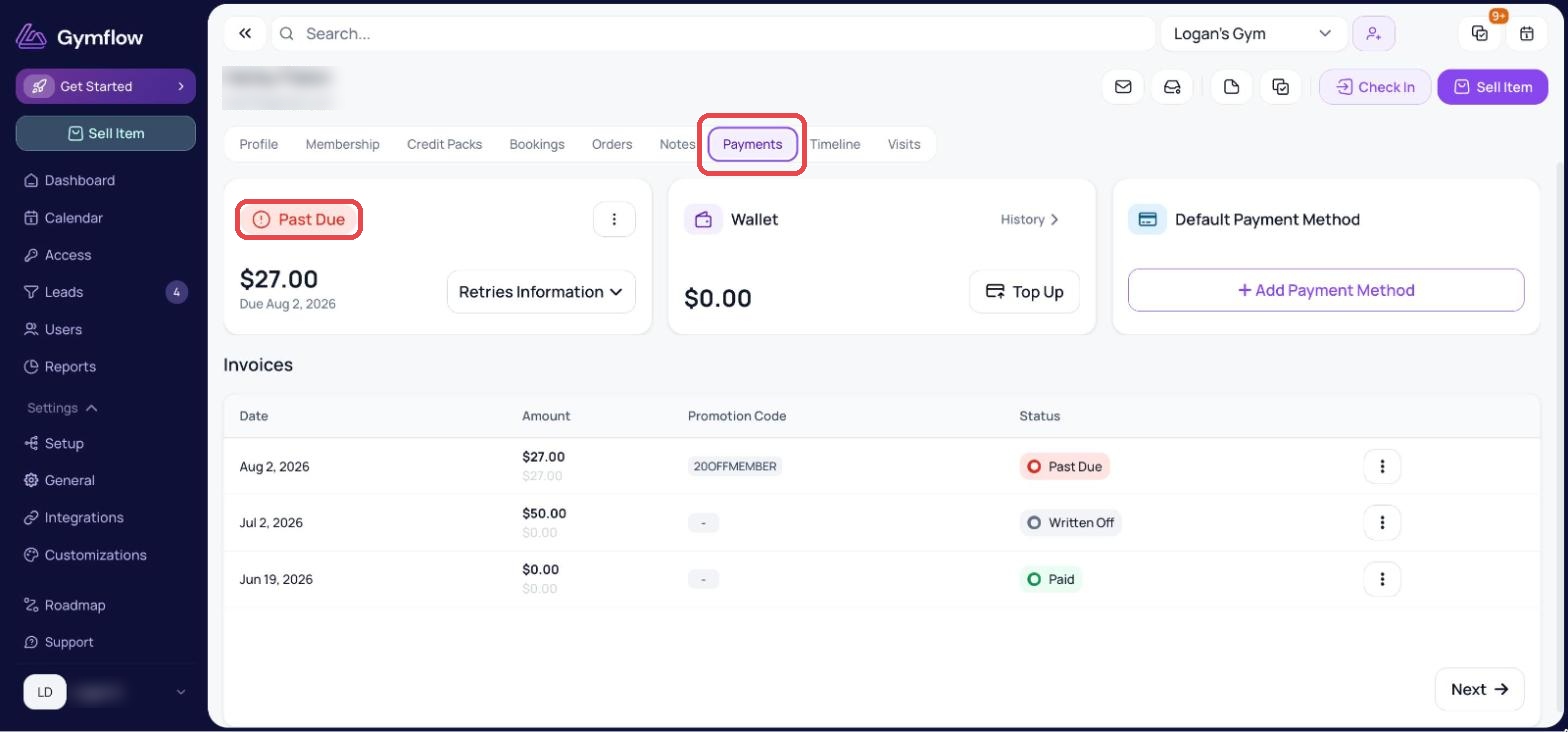
After successfully collecting the payment the invoice will be marked as paid and if it was for a membership, the membership will change back to an Active status.
If the payment fails Gymflow will show you the reason from the bank for the failure.
If a member cancels with an overdue invoice, and rejoins later, they will still see their overdue invoice due on their account. This means that even if a user purchases a new membership, they won’t be able to access the gym unless they pay their past due invoice.
If you want to reduce or remove this overdue amount, a credit can be applied or the payment can be written off.
Was this helpful?
Still need help? Share an idea