Membership Billing Overview
Learn how your memberships are billed
Written By Isaac Buchanan
Last updated 9 months ago
When you sell a recurring membership Gymflow creates a subscription with the amount, frequency and billing date you specified when you created the membership.
Understand How Membership Billing Works
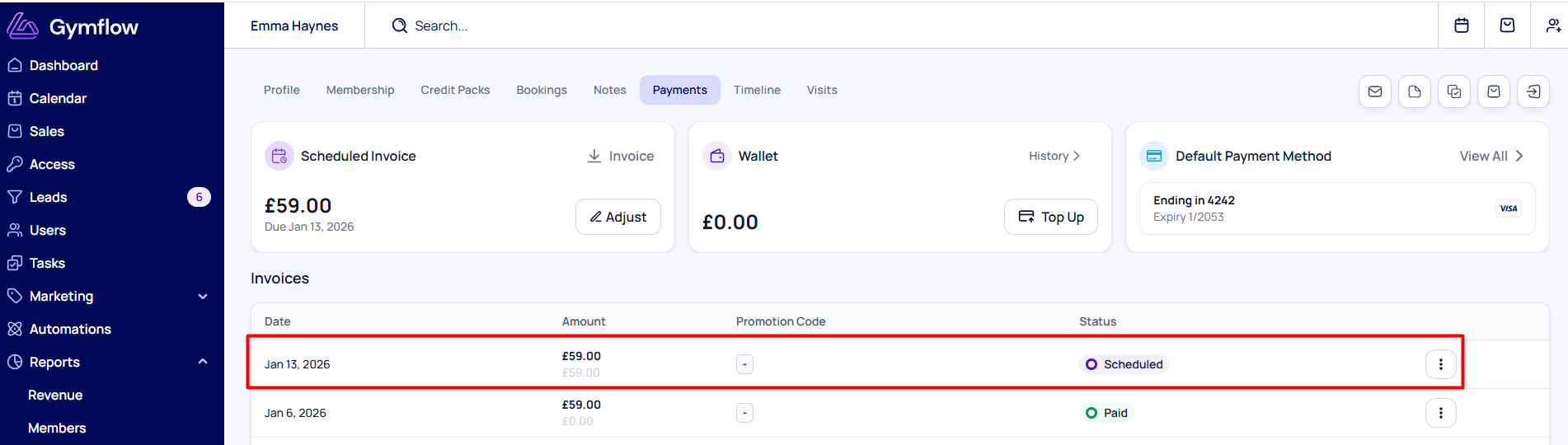
For each recurring subscription Gymflow will create a scheduled invoice which represents the next subscription payment due for the membership.
We only generate one scheduled invoice and when its successfully paid we automatically generate the next bill and so on. You can view these invoices in two places:
On the user Profile on the Payments tab
On the Scheduled Billing report
Automatic Payment Collection
Every morning, Gymflow automatically checks all invoices scheduled for that day and charges the card on file for the amount due on each member’s subscription.
Typically, around 95% of subscription payments are collected successfully. These invoices are marked as Paid, and the revenue appears in your reports.
For the small percentage of payments that do fail, 80–90% are usually due to insufficient funds. If you have the retry system enabled (it’s on by default), these payments will be automatically re-attempted. You can learn more about this in Managing Failed Payments.
If you offer classes or utilise our access control system bookings and access will automatically be disabled until payment has been made.
Was this helpful?
Still need help? Share an idea