Release Notes

Follow new updates and improvements to Gymflow.

πŸ“¦ Track and Fulfil Product Orders

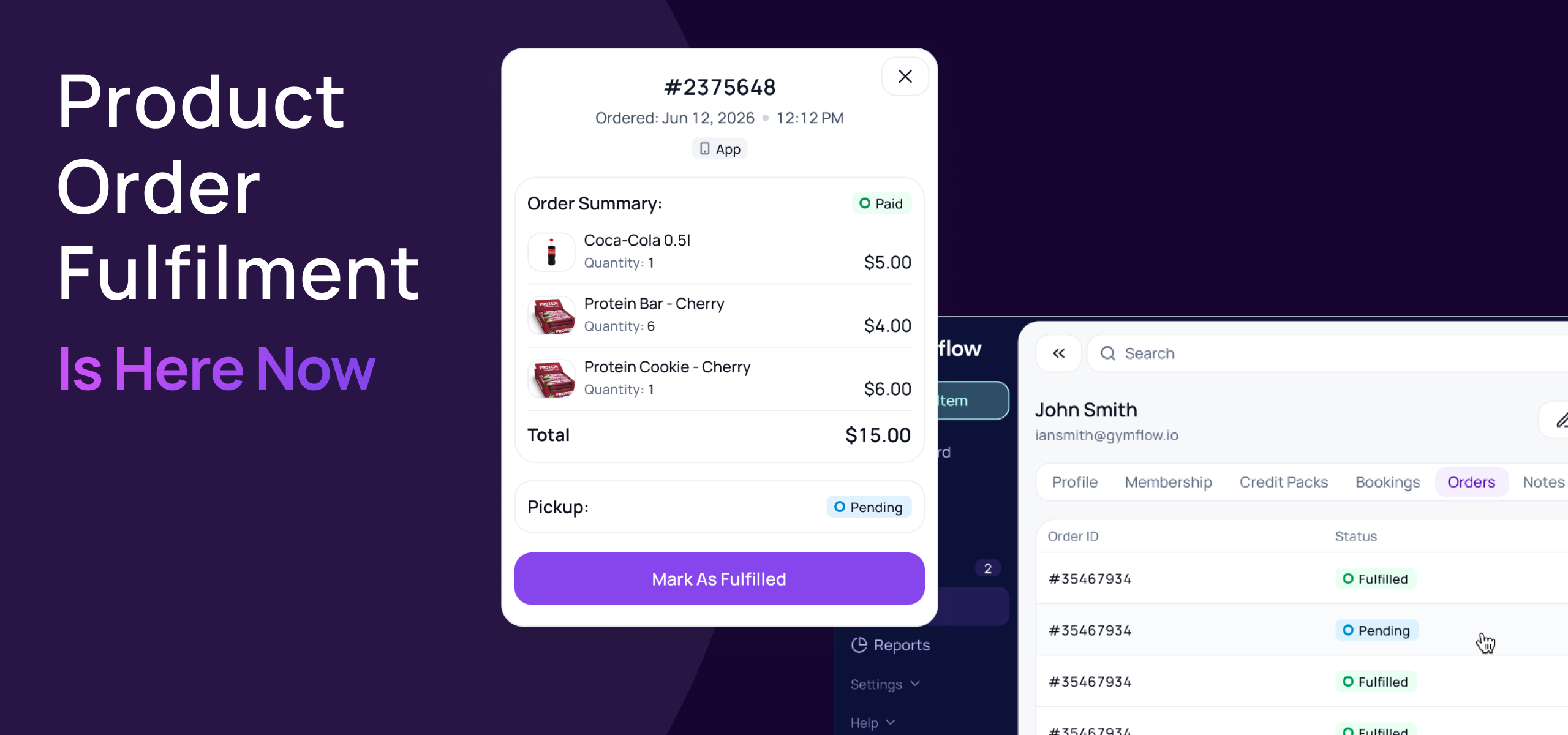
You can now track every product order placed on your website or in the Members App, and mark it as fulfilled when the customer picks it up.

Going live Wednesday 30th September.

πŸ›’ Track online and app orders

  • See what's waiting: products bought online or in the app arrive as Pending until they're collected.

  • New Orders tab: every member profile now shows their full order history, with status, date and items.

  • No extra steps for in-club sales: products sold through the staff Shop are marked Fulfilled automatically.

βœ… Fulfil orders at pickup

  • Find the order fast: members can show their order from My Orders in the Members App, or staff can find it on the member's Orders tab.

  • One click to fulfil: hand over the items and click Mark As Fulfilled. Gymflow records who fulfilled it and when.

πŸ” Restock when you refund

Refunding a product order now asks what to do with the stock:

  • Reverse: refund and put the items back in stock.

  • Keep as fulfilled: refund without restocking, for example if the item has already been collected.

All your existing product orders have been marked as fulfilled, so there's nothing to tidy up. Read the full guide here.


We'd love to hear how it works for your club.

Kind regards,
The Gymflow Team

🏟️ Split Your Facilities Into Bookable Spaces

Full court, half a court, quarter courts. Facilities can now be split into smaller bookable spaces, so you can reserve the whole thing or just a part of it, without creating a pile of separate facilities and hoping nobody double-books.

🧩 Facilities can now have multiple parts

A facility can be broken down into sub-spaces, and further sub-spaces. Spaces are clearly labelled so staff and members always know exactly what’s booked.

  • Two levels: each facility can have up to 10 sections, and each section can have up to 10 subsections.

  • Each part is a real space: parts carry their own access groups and image, so they are proper bookable spaces.

βœ… Automatic availability across all spaces

Availability is now worked out with sections in mind, not just the space as a whole.

  • Book one part and the rest lock too: if the full pitch is taken, none of its courts can be booked for that slot. If a single court is in use, the full pitch can't be sold.

  • Blocked time follows the same rules: blocked time applies up and down the hierarchy automatically.

πŸ“… Built into the flows you already use

  • Bookings: create, edit and reschedule classes and appointments against a specific space. Staff and members choosing a a slot see the individual spaces, not just the top-level facility.

  • Calendar filtering: the facility filter now understands parts, so you can narrow the calendar to a single court or bay.


Built primarily for pitch, court and turf bookings β€” but useful anywhere one room does more than one job. Let us know how you end up using it.

Kind regards,
The Gymflow Team

🧱 The New Membership Builder Is Here

We've rebuilt membership creation and editing. Quicker to set up, and no longer set in stone once you've sold it. Credits built in rather than linked, self-serve rules are set per membership, and your terms are written for you.

✏️ Edit memberships after they're sold

Need to correct a mistake, perhaps change booking credits or rules on a plan, now updating included credits, rules, door access groups or renaming updates existing members automatically.

Whilst editing prices and terms will still only apply to new membership sales.

🎟️ Booking credits made simple

No more creating separate packages and bundling in. Assign any number of credits to any membership without needing to create a separate package. Easily come back and edit booking credits if you need to adjust the amounts or allowed categories.

βš™οΈ Self-Serve rules per Membership

Cancellation, pausing and switching rules now live at the membership level. Allow you to provide different rules for different memberships, increase the flexibility of your offers.

πŸ“„ Terms builder & templates

Membership terms are automatically generated based on the configuration of your membership, given you maximum possible protection from payment disputes with clearly laid out and digitally signed terms.

Customise the membership terms per plan to suit your club as you like.


These changes make membership creation and editing a breeze. Please let us know if you have any feedback on these improvements.

Kind regards,
The Gymflow Team

Earlier updates