Purchase a membership
Learn how to purchase a membership
Written By Anna Gertsen
Last updated 9 months ago
Open the mobile app and select the Shop tab (the shopping app icon in the bottom menu).
Find the membership you’d like to purchase and tap “View more“
Read the Terms and Conditions, tick the box to accept them and proceed to Checkout
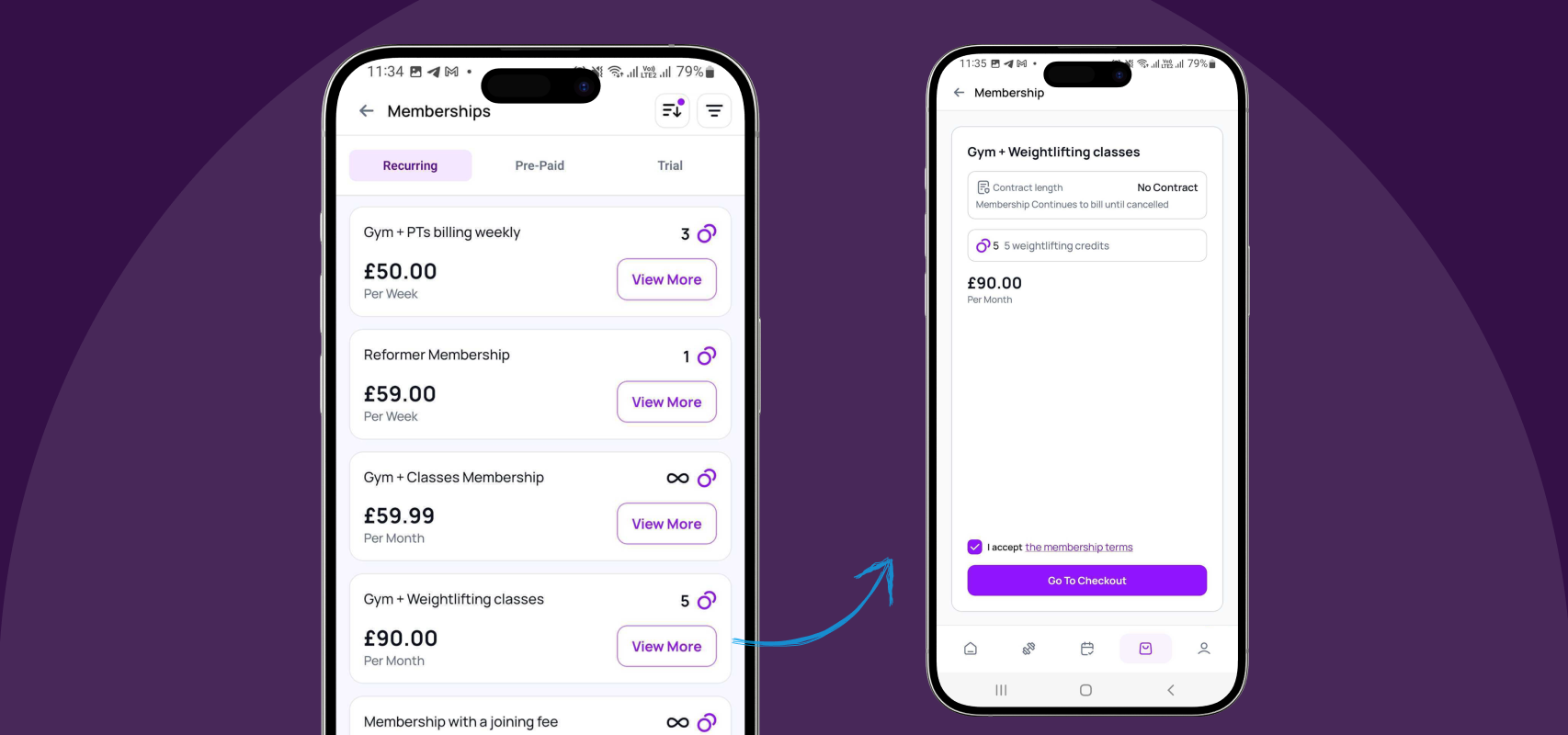
Types of memberships you can purchase:
Recurring Memberships
A recurring membership is billed automatically at the start of each billing cycle (for example, every week, every two weeks, or every month, depending on your club’s setup). Payments are taken automatically each time the membership renews and will continue until the membership is cancelled or paused.
Whether you can cancel or pause your membership through the Members App is decided by your club. If you don’t see this option in the app, it means self-service is disabled and you’ll need to contact the club directly.
Pre-Paid Memberships
Pre-paid memberships are billed once and expire at the end of a fixed period (for example, a 1-day pass or a 6-month pass). They do not renew automatically.
Once the membership expires, you’ll need to purchase a new one to continue accessing the gym.
Trial Memberships
Trial memberships work similarly to pre-paid memberships: they are billed once and expire at the end of a set period (for example, one day or one week).
Clubs often use trials for special introductory offers, and these can usually only be redeemed once.
Was this helpful?
Still need help? Share an idea